

Trade panel
The trade panel sits on the right of every coin page. Market orders work on all five chains.
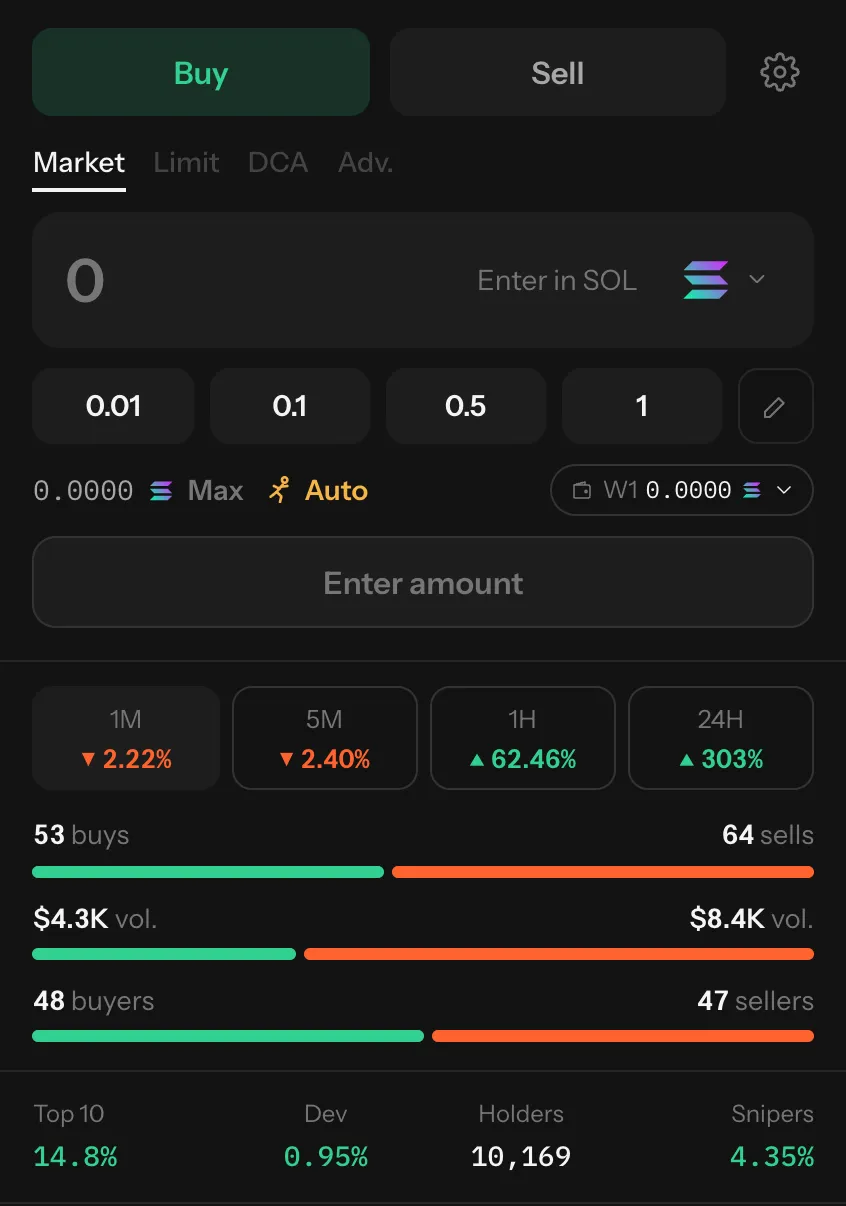
| Part | What it does |
|---|---|
| Buy / Sell | The side of the trade |
| Market | Trade now at the best route. Limit, DCA and Adv. are shown greyed out: they’re coming. |
| Amount box | Type an amount. The menu at its right picks what you pay with (or, selling, what you receive). |
| Quick amounts | One-press amounts. The pencil edits them. |
| Balance and Max | What the active wallet holds of the pay coin; Max fills it in, less a little for the network fee. |
| Slippage readout | The slippage the trade will use (Auto by default). Press it to change settings. |
| Wallet (W1…) | The wallet that trades. Press to switch. |
| Buy / Sell button | Sends the trade. Shows Buy {coin} instantly when the amount is already signed. |
What you can pay with
Section titled “What you can pay with”| Chain | Pay with |
|---|---|
| Robinhood Chain | ETH, USDG |
| Solana | SOL, USDC, USDT |
| Base | ETH, USDC |
| BNB Chain | BNB, USDT, USDC |
| Ethereum | ETH, USDC |
Quick amounts
Section titled “Quick amounts”| Paying with | Defaults |
|---|---|
| SOL | 0.01, 0.1, 0.5, 1 |
| ETH | 0.001, 0.005, 0.01, 0.05 |
| BNB | 0.01, 0.05, 0.1, 0.5 |
| Dollar coins | $10, $25, $100, $250 |
| Selling | 10%, 25%, 50%, 100% of what you hold |
After you press Buy or Sell
Section titled “After you press Buy or Sell”A popup follows the trade: quoting, signing, sending, landed. When it lands, the popup links to the transaction and your position shows in Portfolio.